
Kindle Paperwhite: Not for the Left-Handed

I finally ordered a Kindle Paperwhite last week. I’ve had a Kindle Keyboard for two years, and I love it, but I decided I’d try out the Paperwhite because of the higher color contrast.

The Paperwhite arrived yesterday. I really wanted to like it. But my experience with it so far is pretty disappointing.

I’m left-handed, and I find that turning the page on the Paperwhite — the thing you do more than anything else on the Kindle — is a pain in the ass.

WIth the old Kindle Keyboard, I could rest my thumb on the page-turning button while reading, and when I wanted to go to the next page I would just apply light pressure to the button, barely needing to move my thumb at all. It was practically automatic. But turning the page on the Paperwhite is much more difficult.

In order to go to the next page on the Paperwhite, you touch the screen. That would be fine if I were holding the Kindle with my right hand, because my right thumb could rest on the bezel while reading, and to turn the page I could just gently rock my thumb and touch the right edge of the screen where it meets the bezel.

It doesn’t work that way if you hold the Kindle with your left hand, because the left half-inch or so of the screen is reserved for going to the *previous* page:
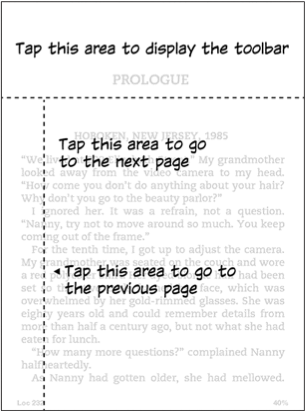
Screen-Shot-2012-10-06-at-4.49.10-PM

So when I’m holding the Kindle with my left hand — which is the way I hold the Kindle — I need to lift my thumb from the bezel, move it at least 3/4 of an inch sideways, and then touch the screen. If I don’t move my thumb far enough to the right, I accidentally go back a page, so I need to overcompensate and move my thumb even further into the main tap zone than it should need to go. And then, when I move my thumb back to the bezel, I have to make sure I don’t accidentally touch the left edge of the screen, or else I wind up go back to the previous page. This may not sound like a big deal, but try doing it several dozen times, or even 100 or 200 times, in one reading session. It’s a total pain. It also destabilizes the Kindle in your hand, which is not good when you’re standing on a moving subway.

I did not realize how big of a problem this would be. And ridiculously, there is no way to change the tap zones in the Settings menu.

I miss the page-turning buttons. Not everything has to be about touchscreens.

So unfortunately I’m going to return the Paperwhite and stick with my old Kindle Keyboard until they release either a software update or a new Kindle with page-turning buttons. What a disappointment.

Between Books

Last week I finished reading a long book, and I’m trying to find a new one. So far, no luck.

I’ve got several dozen book samples on my Kindle, but none of them seems to be grabbing me. I keep switching back and forth between different books until my interest latches onto it. I guess that’s the nice thing about the Kindle, though: I can carry more than one book with me at a time.

I’m switching back and forth among Diarmaid McCulloch’s Christianity (a history book), Richard Evans’s The Third Reich in Power (I read the first book in his trilogy, The Coming of the Third Reich, a few years ago), and Erik Larson’s In the Garden of Beasts, also about Nazi Germany. But I’ve reached the end of the sample of that last one, and I can’t seem to get myself interested enough to pay for the whole book.

Why such depressing subject matter? I don’t know. I just find it interesting. But apparently not interesting enough to latch onto right now for a full read.

Maybe I need a break from reading the Kindle screen? Maybe I miss old-fashioned paper books?

I don’t know. I’m sure some book will call out to me soon enough.

Kindle Follow-Up

I’ve had a Kindle for just over two weeks now. I was unsure whether I’d like it, but over the past two weeks I’ve decided that I like it a lot. I’ve gotten used to reading on it — although I keep going to Amazon.com’s “Look Inside” feature and doing a search so I can see how many pages I’ve “really” read. The Kindle’s progress bar isn’t really accurate with the book I’m reading, because it’s a history book, and all the footnotes, bibliography, etc. are at the end. The Kindle considers this end matter to be part of the book, so it includes it when calculating what percentage of the book I’ve read. It says I’ve read about 46 percent, but excluding the end matter, I’ve really read about 64 percent.

Last week we visited Matt’s parents, and it was great to have the Kindle with me. The only problem was that I couldn’t read it on the airplane during takeoff or landing. I’m not convinced that the Kindle can mess with a plane’s flying instruments, especially if you have the wireless turned off — the Kindle only draws power when you press a button to change what’s on the screen, so when you’re reading a page, it draws no power at all. But I didn’t want to disobey the flight attendants.

I should point out that I’m actually on my second Kindle. I returned the first one to Amazon because of a cosmetic issue — a slight dimple in one corner of the plastic casing that was noticeable in certain light and kept distracting me while I was reading. The return was pretty simple; I called Amazon and explained the problem, and a new Kindle arrived the very next day; all I had to do was put the old one in the box, print out and attach a shipping label, and take it to UPS.

My new Kindle has not been problem-free; a few times I haven’t been able to wake it up from sleep without rebooting the whole thing, and when I wake it up, the Kindle thinks the time is 4:00 and the list of recently-opened books is in the wrong order. It’s been a few days since this last happened, so maybe it was just a glitch and it won’t happen again.

Anyway — the Kindle’s great, and I’m glad I bought it.